Support & Client Management

The platform your team needs to stop losing tickets and billable hours

Epikou brings together tickets, work plans with acceptance criteria, hour banks, sprints and a knowledge base, with your clients inside. On the Business plan, Claude Code works tickets over MCP with your own permissions.

Free plan to get started. From €9 per agent per month, and your clients get in free on every plan.
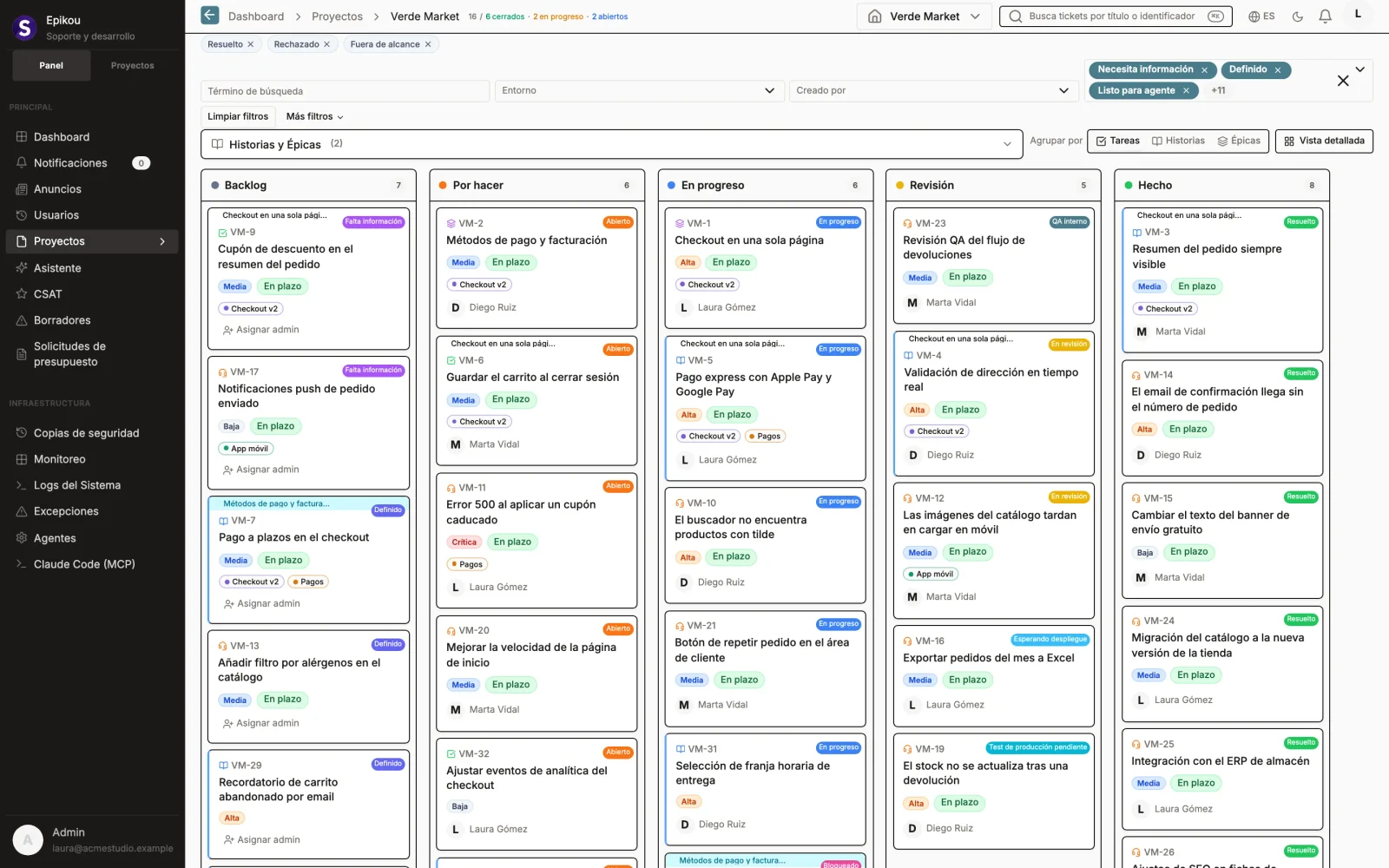
Epikou Kanban board with Backlog, To do, In progress, Review and Done columns, showing priority, epic and owner on every ticket
The problem we solve

Your team manages clients with 5 tools that don't talk to each other

A timesheet spreadsheet nobody updates. Tickets by email that get lost. A Trello board abandoned months ago. WhatsApp for emergencies. Sound familiar?

60%
of clients leave after a bad support experience

Most don't complain: they simply leave. And they take their recurring contracts with them.

23%
of billable hours are never logged

Without automatic tracking, you give away hours of work to your clients every week.

15h/week
lost coordinating tickets across tools

Email, Slack, Jira, Excel... How many windows do you have open right now?

Integrated modules

One platform, all your clients

Every module connects with the others in real time. No broken integrations, no duplicated data.

Tickets & Support

Every ticket has an owner, a status and a complete history

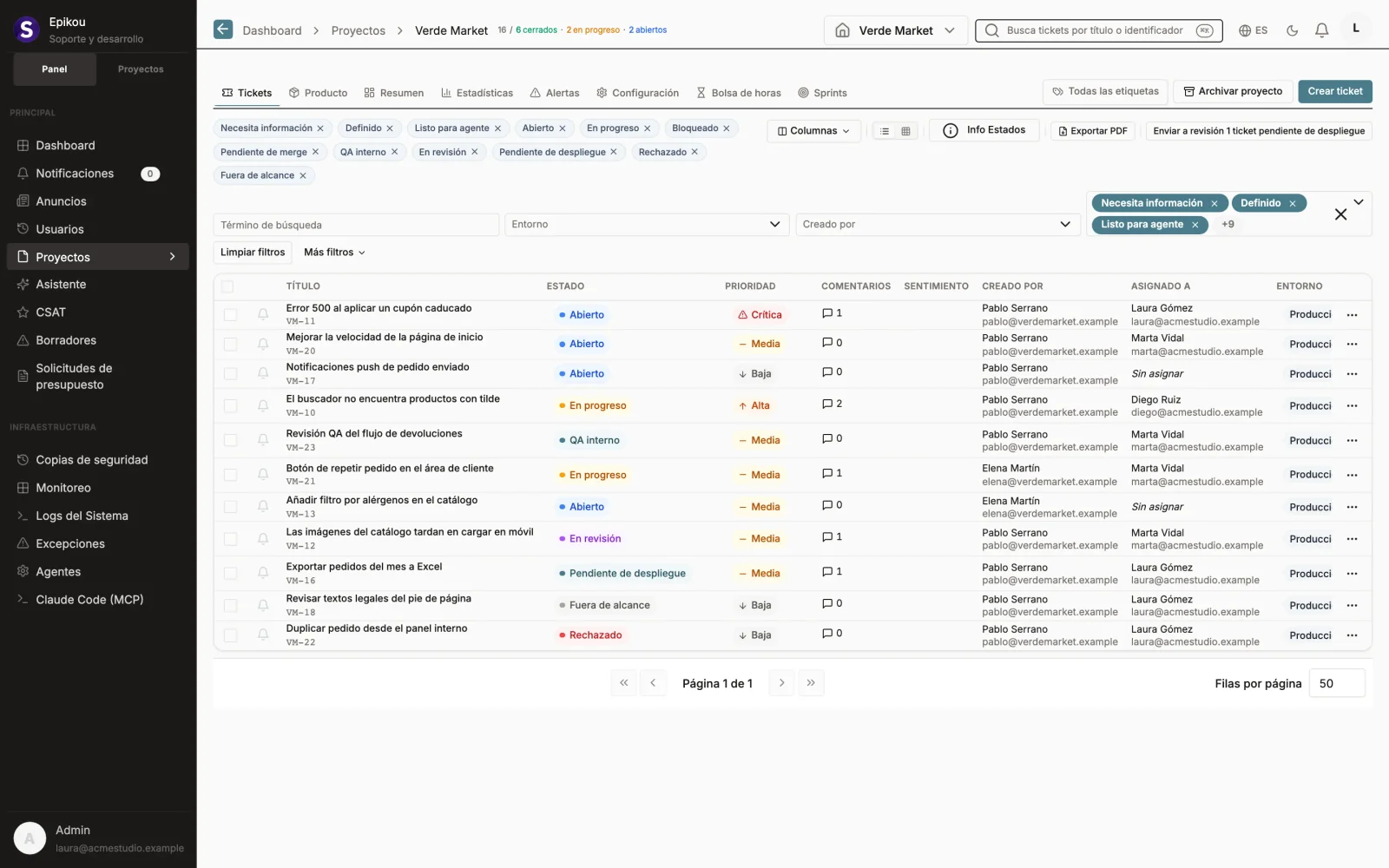
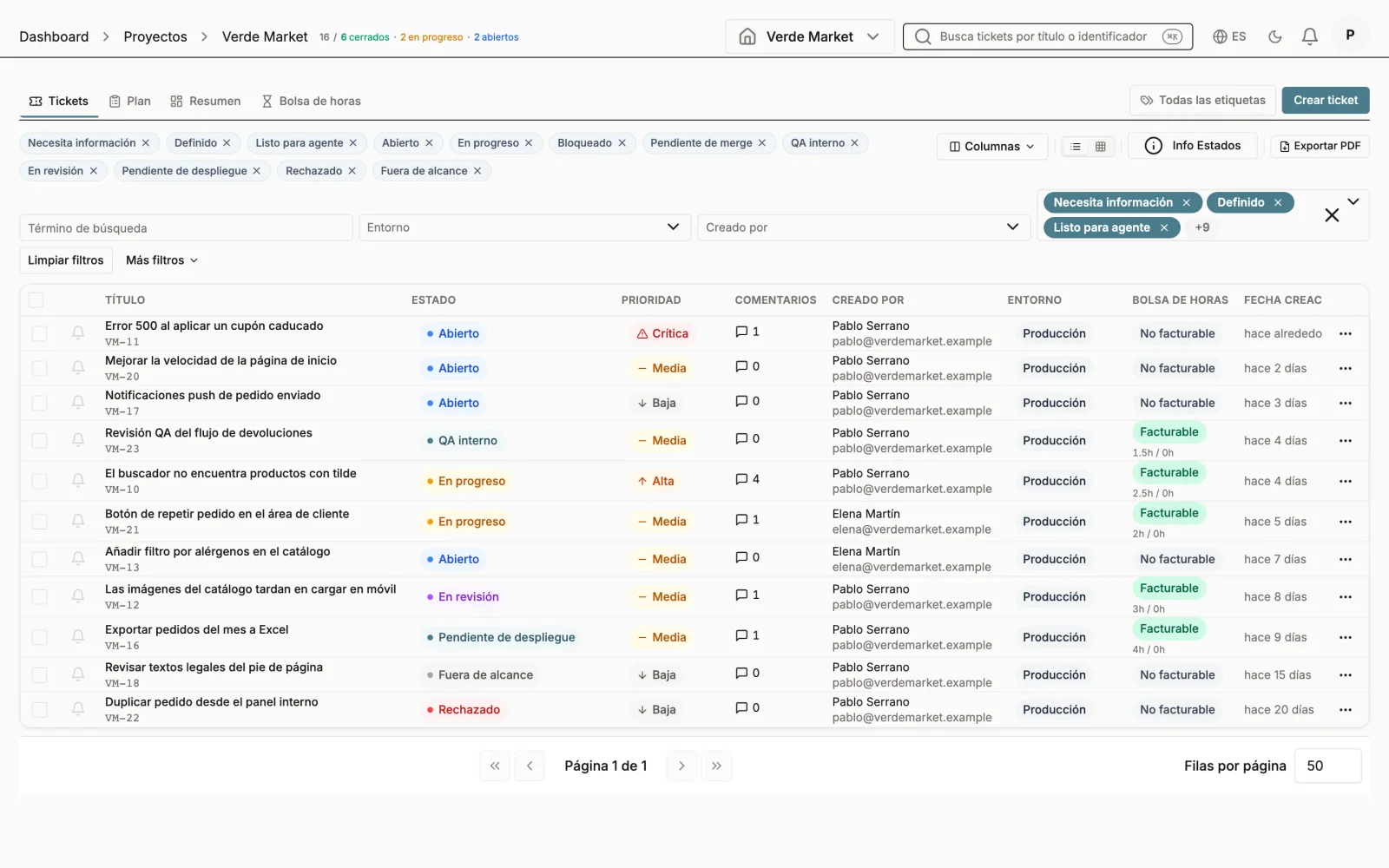
Kanban board with configurable statuses: Needs info, Defined, Open, In progress, In review, Pending deploy, Resolved. Every ticket has a visual priority (low, medium, high, critical), an assigned admin, a type (support, story, task, epic, bug) and a complete activity timeline.
  • Drag & drop Kanban with filters by type, priority and assignee
  • Comments with markdown, mentions and media attachments
  • Full-ticket PDF export to document work for your client
  • Change subscriptions: get notified about what matters to you
  • Group by epics to visualize project progress
Learn all about ticket management
Ticket list for a project in Epikou with status, priority, comments, environment and whether the ticket is billed to the hour bank
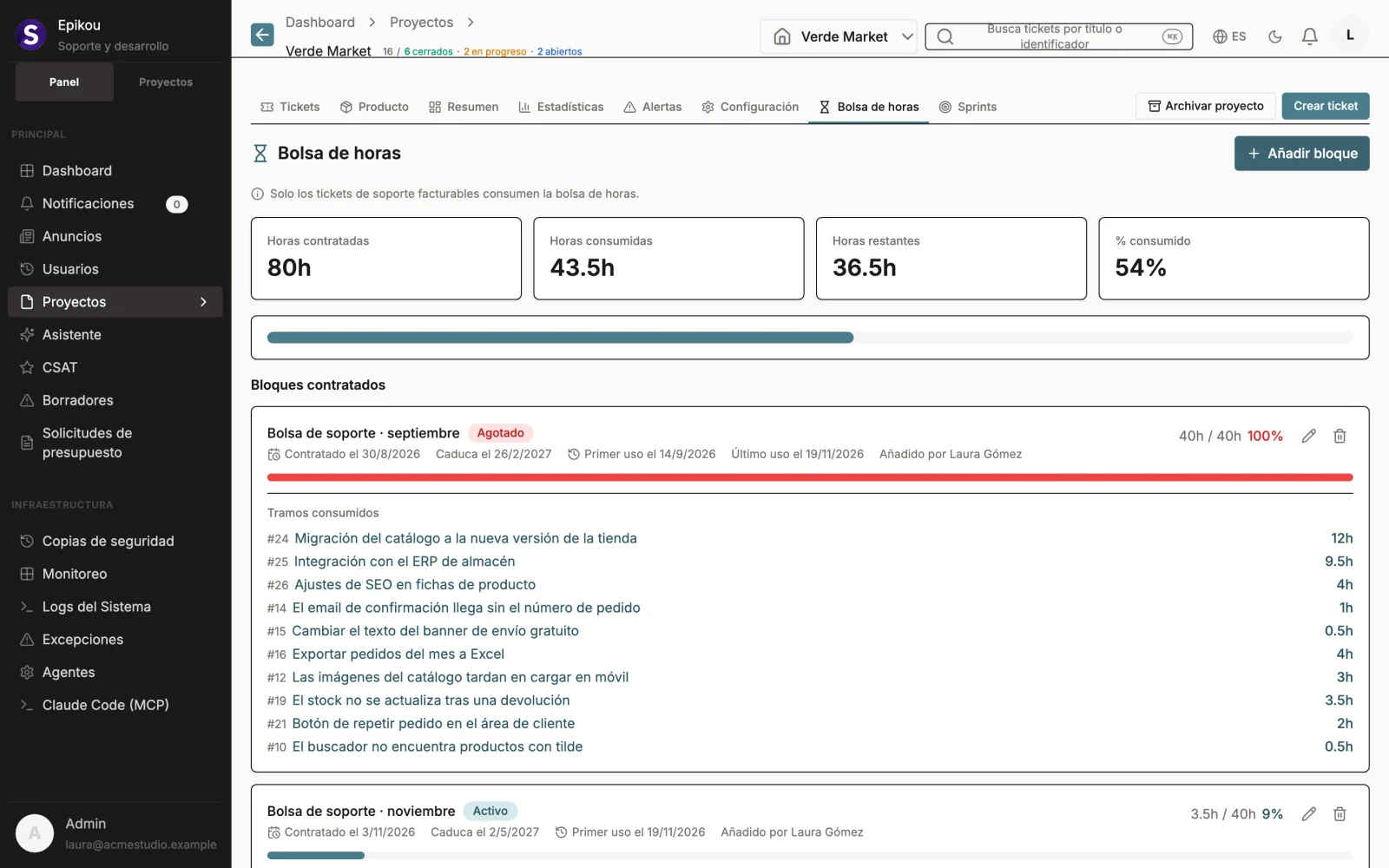
Project hour bank in Epikou: contracted, used and remaining hours, plus blocks with expiry dates and the hours each ticket used
Billable hours

Every hour you work for a client is logged automatically

Contracted blocks with start date, expiry and real-time consumption. Every billable support ticket draws from the hour bank. Visual progress bars. Clients see their own consumption in a limited view. Alerts when a bank is about to run out.

  • Blocks with purchase and expiry dates
  • Automatic consumption linked to every support ticket
  • Depletion and budget-overrun alerts
  • Differentiated views: admins see everything, clients see their consumption
  • History of time consumed by each ticket
Learn all about hour banks
Artificial Intelligence

AI asks what your team needs to know before starting

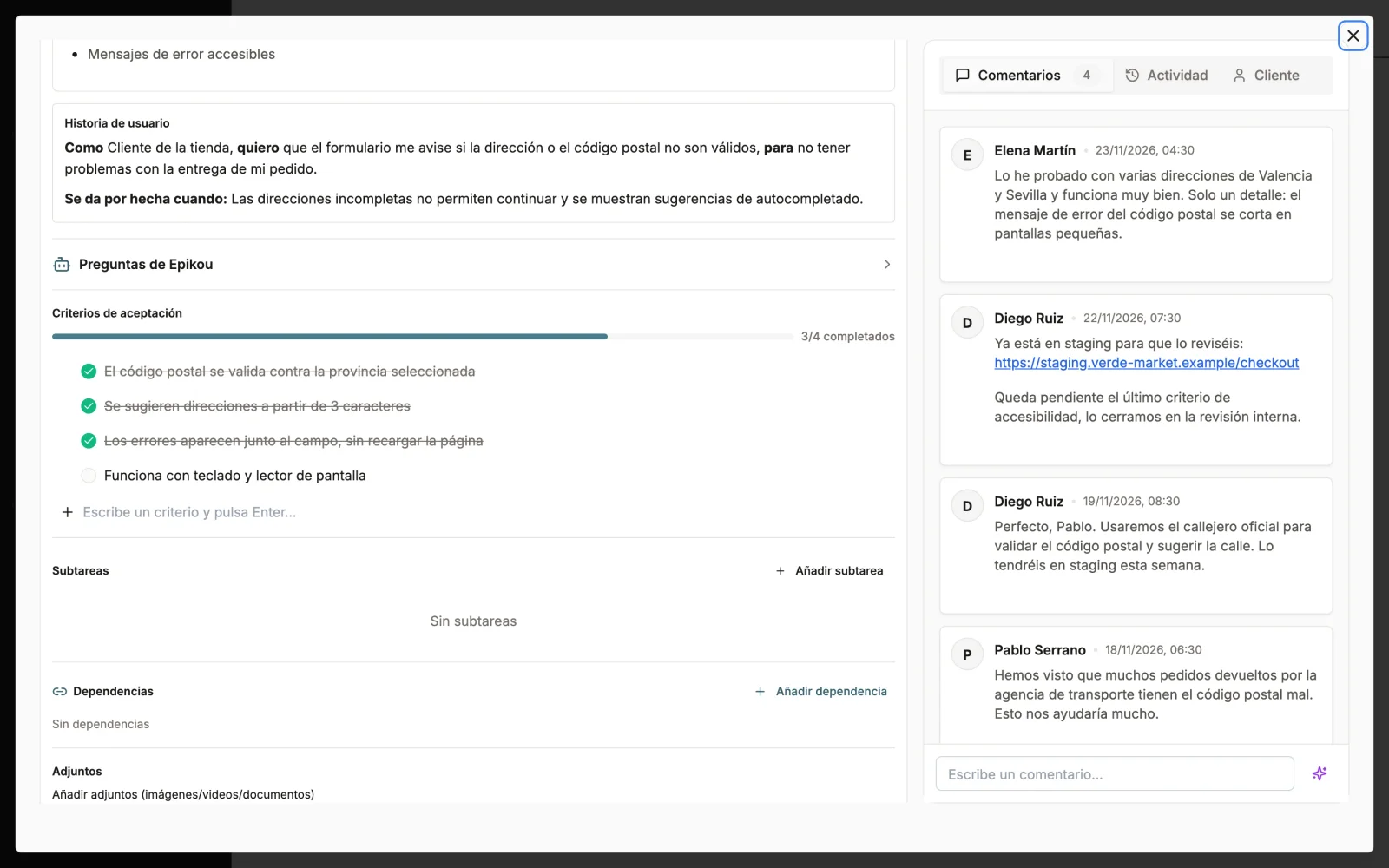
When a client creates a ticket with incomplete information, the AI automatically generates 3 to 8 clarifying questions. Your team stops wasting time asking for details: the system does it on its own. It also analyzes client sentiment (positive, neutral, negative, frustrated) and suggests priority and tags. Available from the Team plan.
  • AI-generated clarifying questions
  • Sentiment analysis: detect frustration before it escalates
  • Automatic priority and tag suggestions
  • AI summaries of long conversations
  • Regenerate questions or request improvements in one click
Learn all about AI in support
Ticket detail in Epikou with the user story, the Epikou questions block, ticked acceptance criteria and client comments
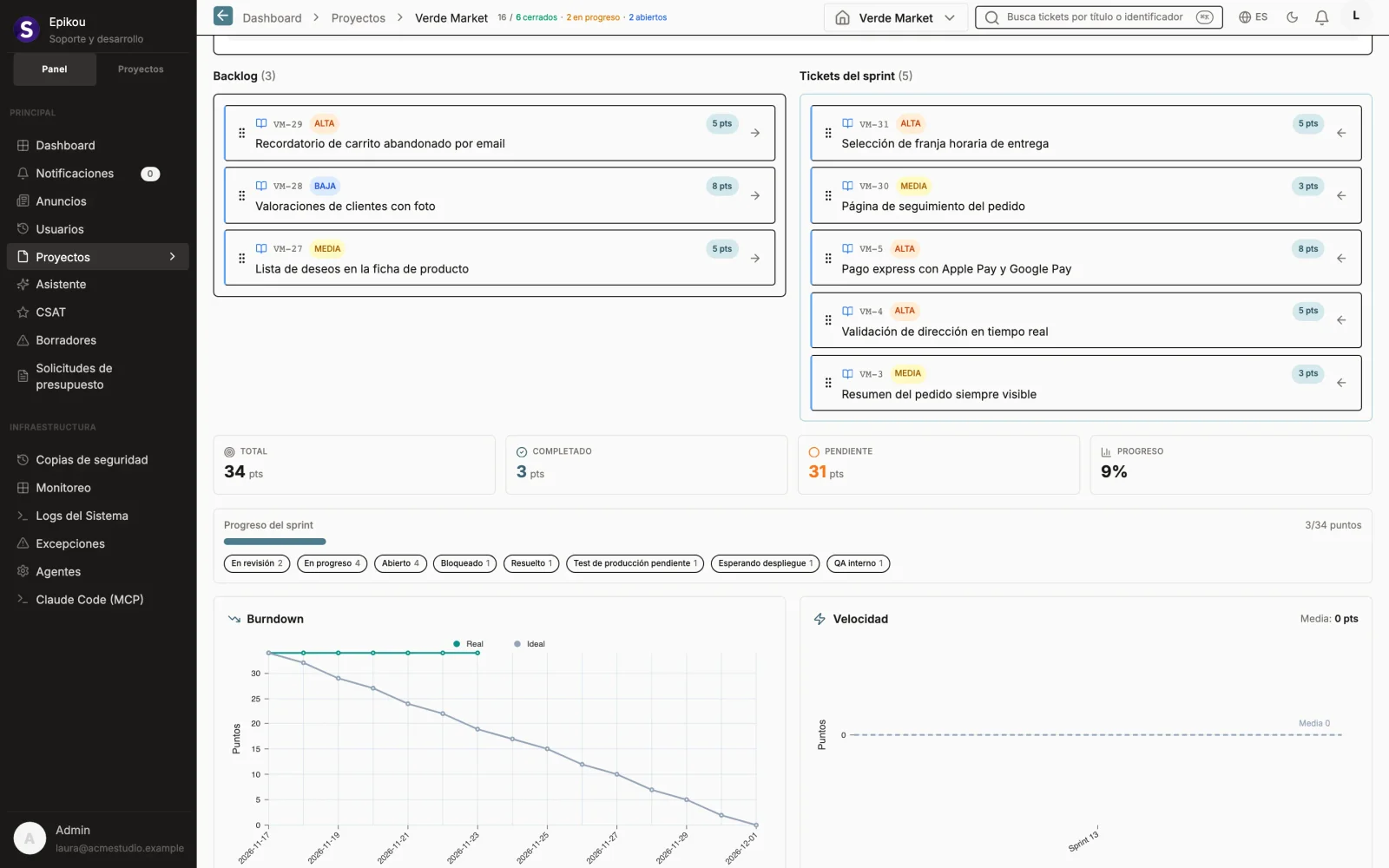
Sprint planning in Epikou: backlog and sprint tickets with points, progress and a burndown chart
Product management

Organize your team's work into sprints with story points

Backlog with drag & drop into the sprint. Full hierarchy: Epics containing Stories containing Tasks. Every item has story points, priority and acceptance criteria. Kanban or backlog view. CSV import and export to fit in with the tools you already use.

  • Sprint planning with drag & drop from the backlog
  • Epics, stories, tasks and bugs with hierarchy
  • Story points and visual progress per epic
  • Acceptance criteria linked to tasks
  • CSV import/export
Learn all about project management
Documentation

Your team and your clients access the same up-to-date documentation

Articles with automatic versioning, categories and configurable visibility (public or internal). AI proposes new articles based on frequent tickets. Upload documents (PDF, Word) and the system ingests and structures them automatically. Every article links to its related tickets.
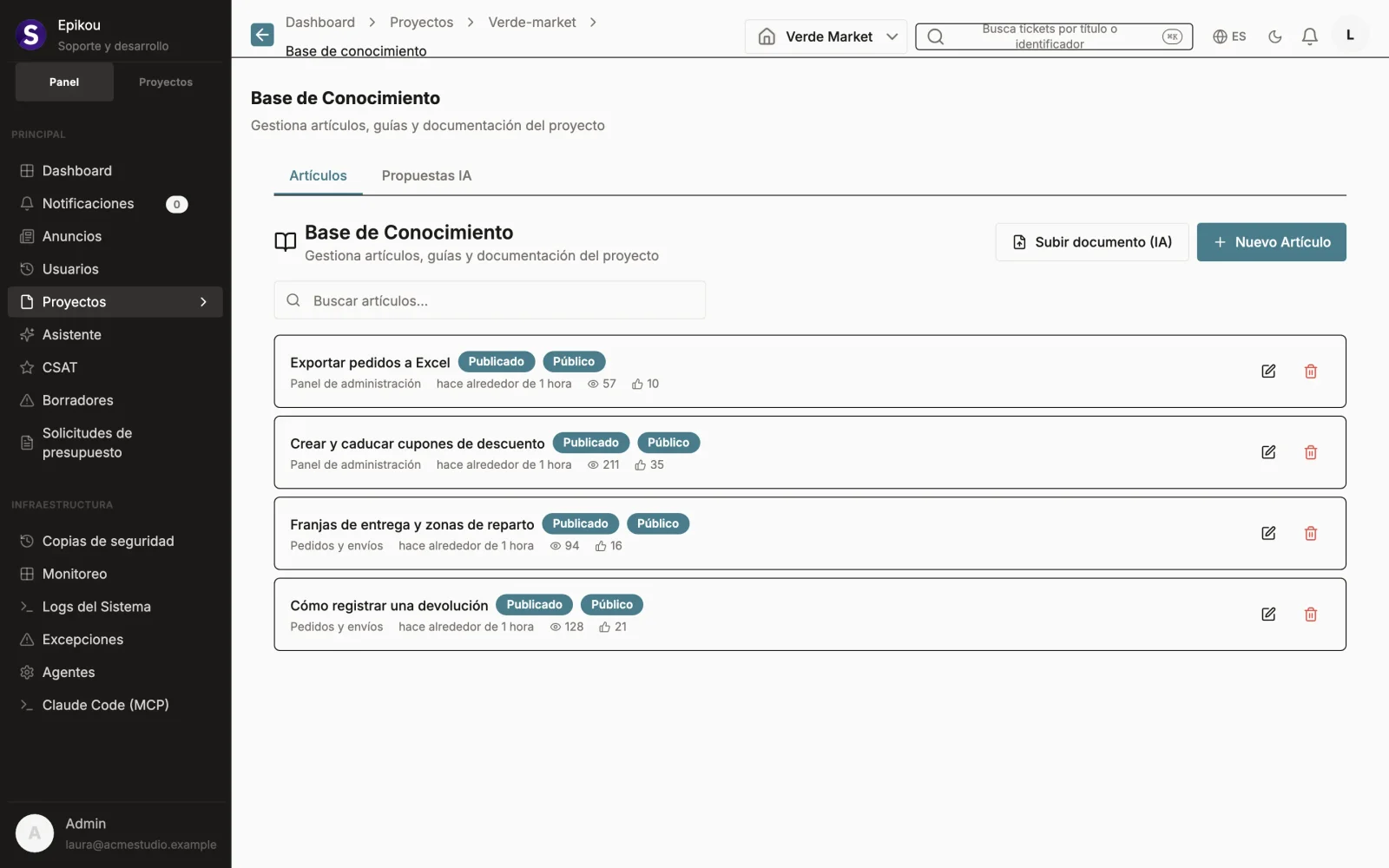
  • Articles with versioning and categories
  • Public (clients) or internal (team) visibility
  • AI ingestion of PDF and Word documents
  • Automatic article proposals based on tickets
  • Article-ticket linking for instant context
Project knowledge base in Epikou with published public articles, an AI proposals tab and document upload
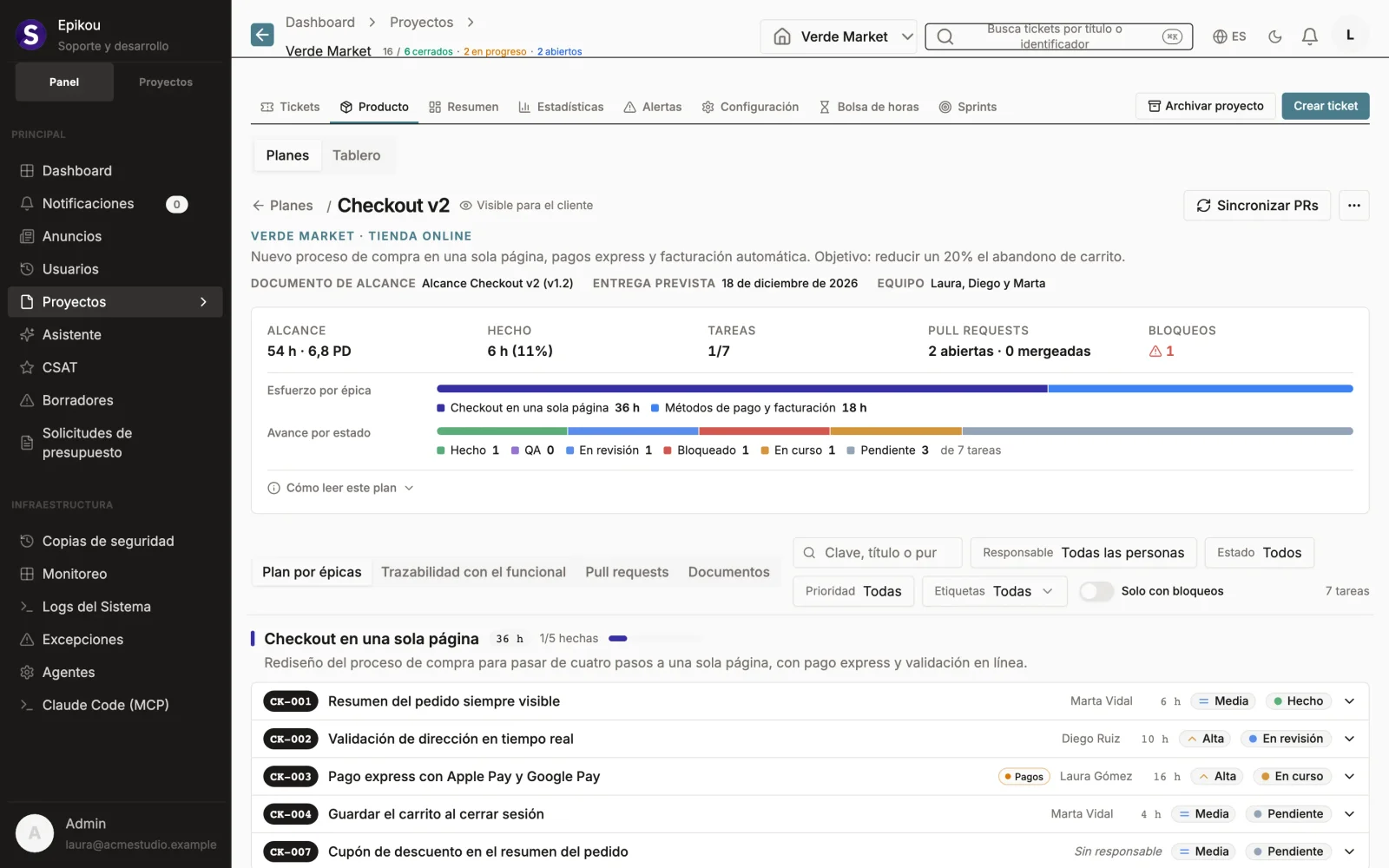
Checkout v2 work plan in Epikou with scope in hours, progress by status, pull requests, blockers and tasks grouped by epic
Work plans

From the scope document to tasks with acceptance criteria

Each plan groups tasks by epic, with an hour estimate, an owner and what the task must meet to count as done. At the top you see scope, work done, open pull requests and blockers. You can make the plan visible to the client so they follow progress without asking you for a report.

  • Tasks by epic with estimate, priority and owner
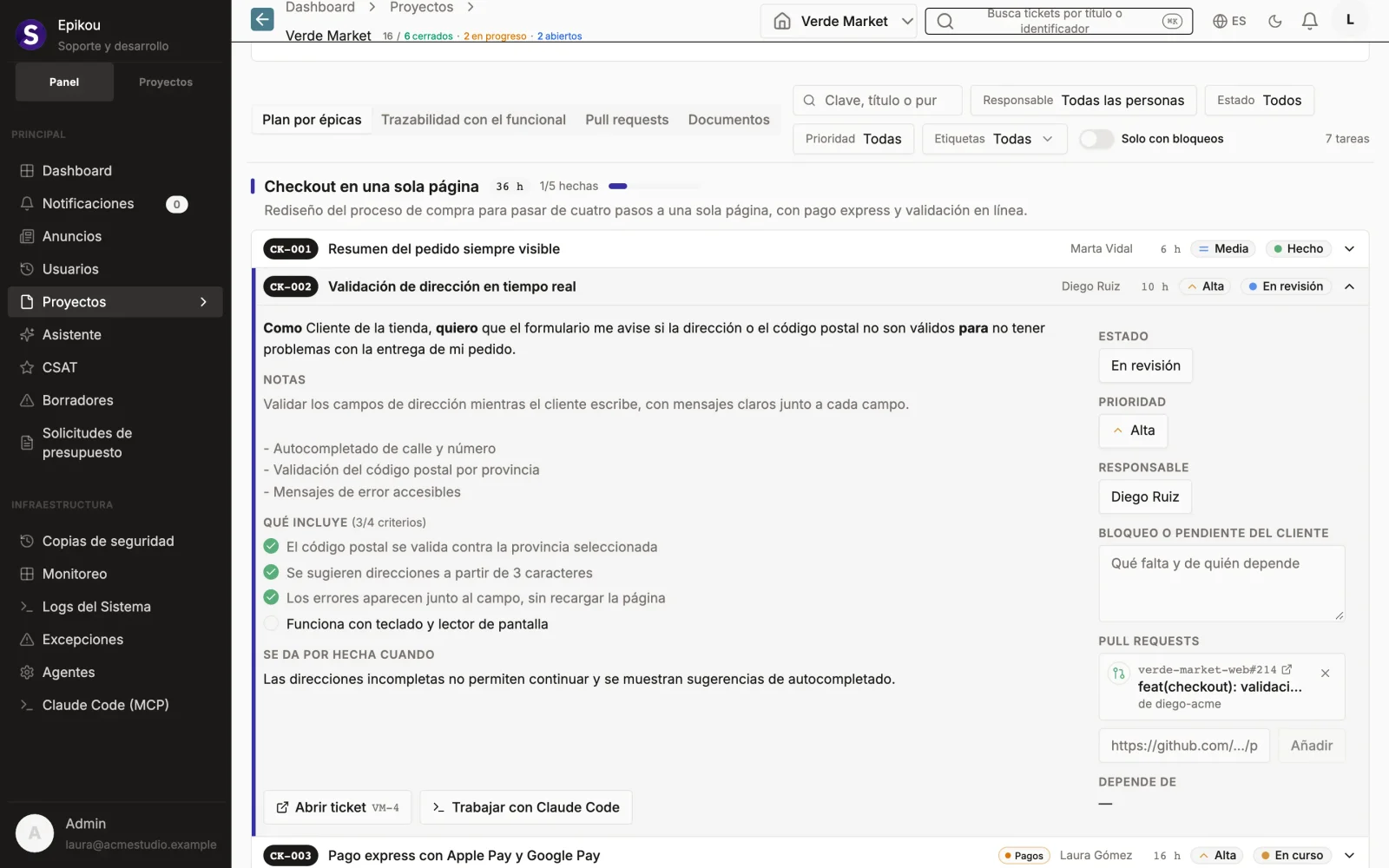
  • Acceptance criteria ticked off one by one
  • Client blockers: what is missing and who it depends on
  • GitHub pull requests linked to each task
  • A client view of the plan, without internal data
Everything about plans and projects
Traceability

Every change on every ticket is recorded forever

A complete activity timeline: creation, status changes, assignments, comments, attachments, priority changes, title edits. Who did what and when. Each task also links the criteria already met and the pull request that resolves it, so you can justify hours and decisions to your client with the full thread.
  • Chronological timeline with every event
  • Who, what and when for every action
  • Inline comments with the context of each change
  • Justify hours and decisions to your client
Task open inside an Epikou plan with met acceptance criteria, In review status, a client blocker field and a linked pull request
Client view in Epikou: their tickets with status, priority, comments and whether they are billed to the hour bank
Self-service

Your clients create tickets, track status and leave feedback without interrupting you

A public portal where clients sign up (email or Google OAuth), create tickets with attachments, follow progress in real time and leave a CSAT rating when the ticket is resolved. Fewer emails, fewer calls, more autonomy for clients and fewer interruptions for your team.

  • Sign-up with email or Google OAuth
  • Ticket creation with media attachments
  • Real-time status tracking
  • Automatic CSAT surveys on resolution
  • Public FAQ and knowledge base
MCP server · Business plan

Claude Code works your tickets with the same permissions as a person

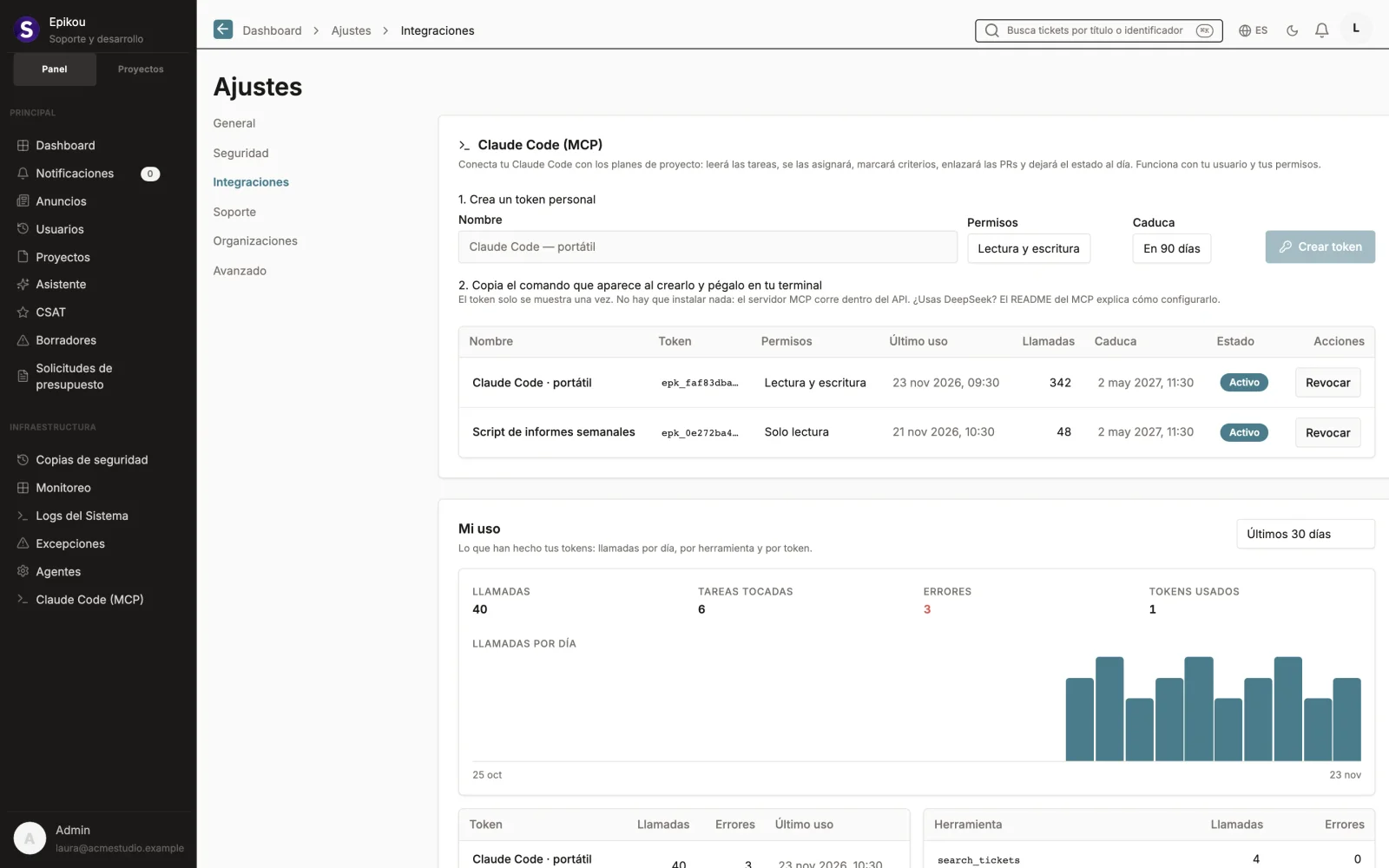
Epikou ships an MCP (Model Context Protocol) server inside its API. Each person creates a token, pastes the command into their terminal, and their assistant can work on the project plan. It works with Claude Code and any MCP-compatible assistant.

What the assistant does

  1. get_task Reads the task, its acceptance criteria and the client comments
  2. claim_task Claims the task so nobody duplicates it
  3. set_criterion Ticks each acceptance criterion as it is met
  4. set_blocker Sets a blocker when something depends on the client
  5. link_pull_request Links the pull request to the task
  6. update_task_status Moves the task to review

The permissions of whoever uses it

The token is personal and inherits its owner's role: if you cannot see a project, neither can your assistant. It can be read-only or read-write, it expires and it can be revoked in one click.

Every call, audited

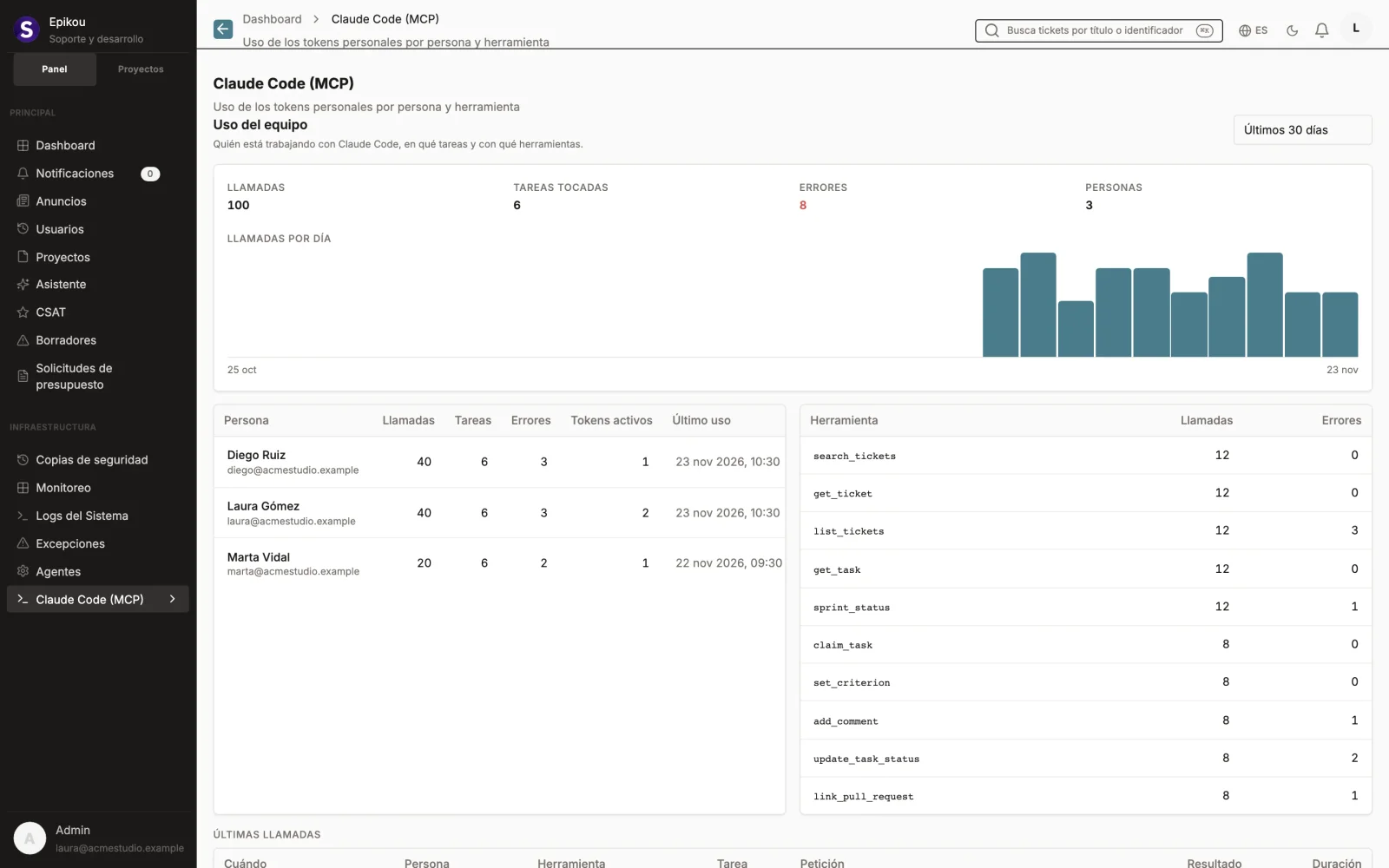
The log records who called, which tool, on which task, the result and the duration. The team view adds up calls, tasks touched and errors per person and per tool.
Included in the Business plan. How the MCP server works See pricing
Epikou settings with the Claude Code (MCP) integration: creating a personal token with permissions and expiry, list of active tokens and calls per day
Personal tokens: permissions, expiry, usage and revocation.
Epikou MCP audit view with calls, tasks touched and errors per person and per tool (search_tickets, claim_task, set_criterion, link_pull_request)
Audit: calls per person and per tool.
20+ modules included

Everything you need, integrated out of the box

Kanban & Backlog
Board or list view, drag & drop, advanced filters
Hour banks
Contracted blocks, automatic consumption, alerts
MCP server
Claude Code and other assistants work tickets with your permissions
AI questions
Automatic clarifying questions for incomplete tickets
Sprints
Sprint planning, story points, team velocity
Knowledge base
Articles, versions, AI document ingestion
CSAT surveys
Customer satisfaction on every resolved ticket
Feature flags
Boolean, percentage, user lists. Controlled rollout
Monitoring
Uptime, latency, environment health checks
Blog / CMS
WYSIWYG editor, tags, drafts, publishing
Granular permissions
Fine-grained control over what each admin can do
CSV Import/Export
Import and export data as CSV and JSON
PDF export
Generate ticket PDFs to justify hours
Built-in OAuth
Google and Facebook. Zero friction for clients
Multilanguage
30+ languages with a built-in translation system
White label
Logo, colors and domain per client (Business plan)
Backups
Automated database backups
System logs
Error, warn, info, debug. Full traceability
Transactional emails
MJML templates, delivery logs, statuses
WebSockets
Real-time updates without reloading the page
REST API + Swagger
Documented API with personal tokens from Starter
Maintenance mode
Toggle on/off with one click for updates
Multi-project
Manage N clients/projects from one platform
KPI dashboard
Key metrics: tickets, users, resolution, satisfaction
Why Soamee

Built for teams that bill hours to their clients

Your clients pay no license

You pay per agent on your team. Clients who open tickets, follow the plan or check their hour bank get in free and without limits on every plan.

Your data, your control

Export all your data at any time. GDPR compliant. No vendor lock-in on your information.

Fits how you work

Configurable statuses, workflows, fields, roles and permissions. You don’t adapt to the software — the software adapts to you.

AI and MCP inside the plan

Summaries, classification and suggestions from the Team plan; an MCP server for Claude Code on Business. No extra per-resolution charges.

One platform, not five subscriptions

Everything you pay for separately today, built in as standard

What you need The usual stack With Soamee
Support A helpdesk where clients see their tickets, but not the plan or their hours Ticketing with a client portal and unlimited clients on every plan
Billable hours An hours spreadsheet nobody fills in Hour banks that draw down on their own with every ticket and warn you before they run out
Product & development Yet another project management subscription Sprints, epics and story points on the same tickets
Documentation A separate wiki that goes stale A knowledge base linked to the ticket, with AI ingestion of PDF and Word
Artificial intelligence A paid add-on charged per seat or per resolution Summaries, classification and suggestions included from the Team plan
Coding assistants Copying and pasting the ticket into the assistant’s chat MCP server: Claude Code reads the task, ticks criteria and links the PR (Business plan)
Your brand with clients The vendor’s logo on every screen White label per client on the Business plan: your logo, your colors, your domain
Your data Limited exports and vendor lock-in Full export at any time, automated backups and GDPR compliance

One login, one history, one tool to maintain. And adding one more client doesn’t change what you pay.
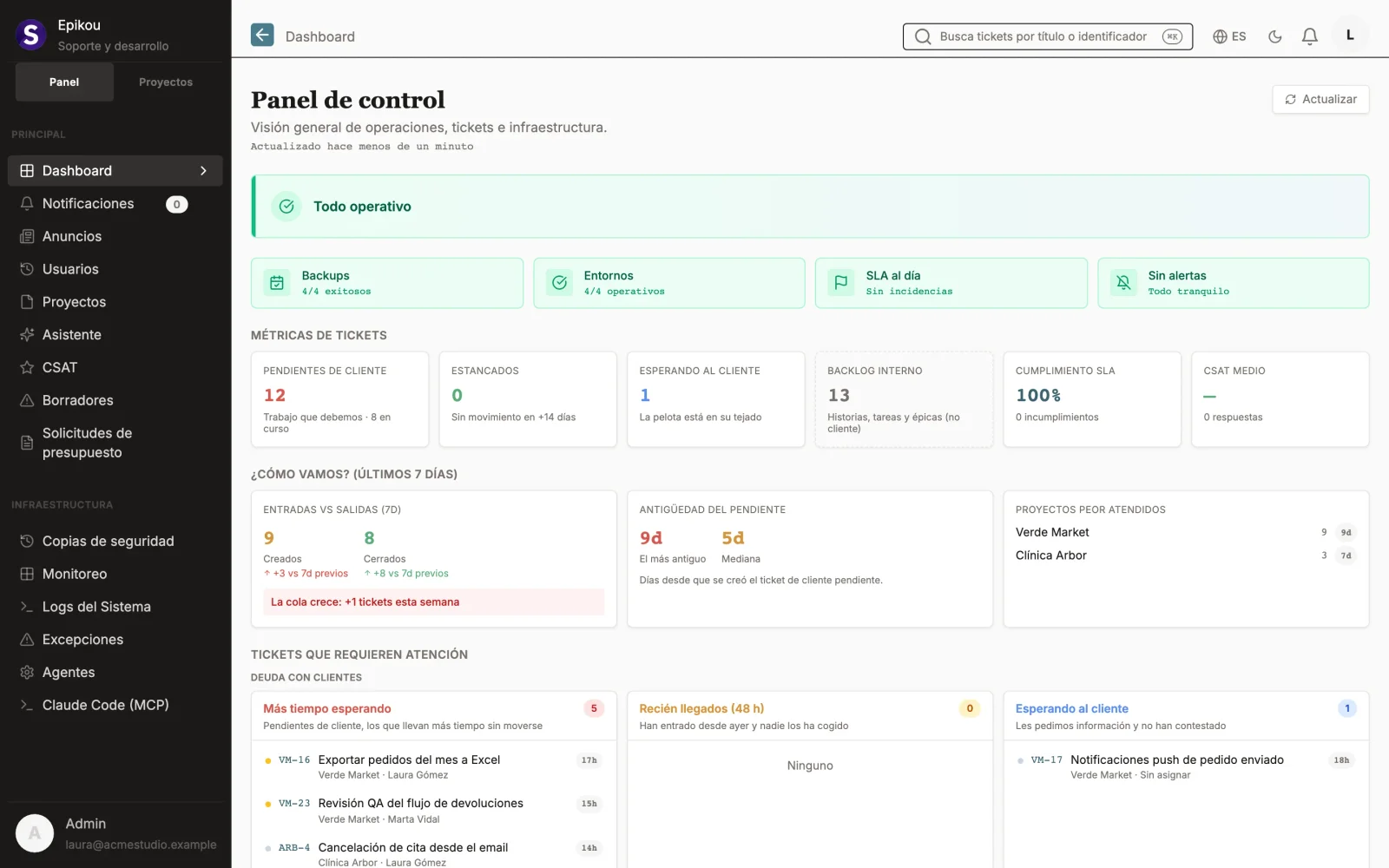
Epikou control panel with backup and environment status, ticket metrics, SLA compliance, worst-served projects and tickets needing attention
All your clients at a glance

Manage 5 or 50 projects from the same platform

Every client is a project with its repositories, environments, tickets and assigned team. The control panel pulls together what matters across all of them: tickets pending on your side, stalled or waiting for the client, SLA compliance, how old the backlog is and which projects are worst served. Switch projects with one click.

On the Business plan, white label per client: every project can have its own logo, colors and domain. Your clients see their portal, not yours.

Ticket detail

All the ticket information in a single place

Status, priority, assigned admin, linked hour bank, estimated and actual hours, affected environment, the client's operating system and browser, creation date, AI questions, attachments and the complete conversation. All without leaving the screen.

Change status and priority with one click. Enable the hour bank so the ticket consumes hours automatically. Export to PDF to send to your client.
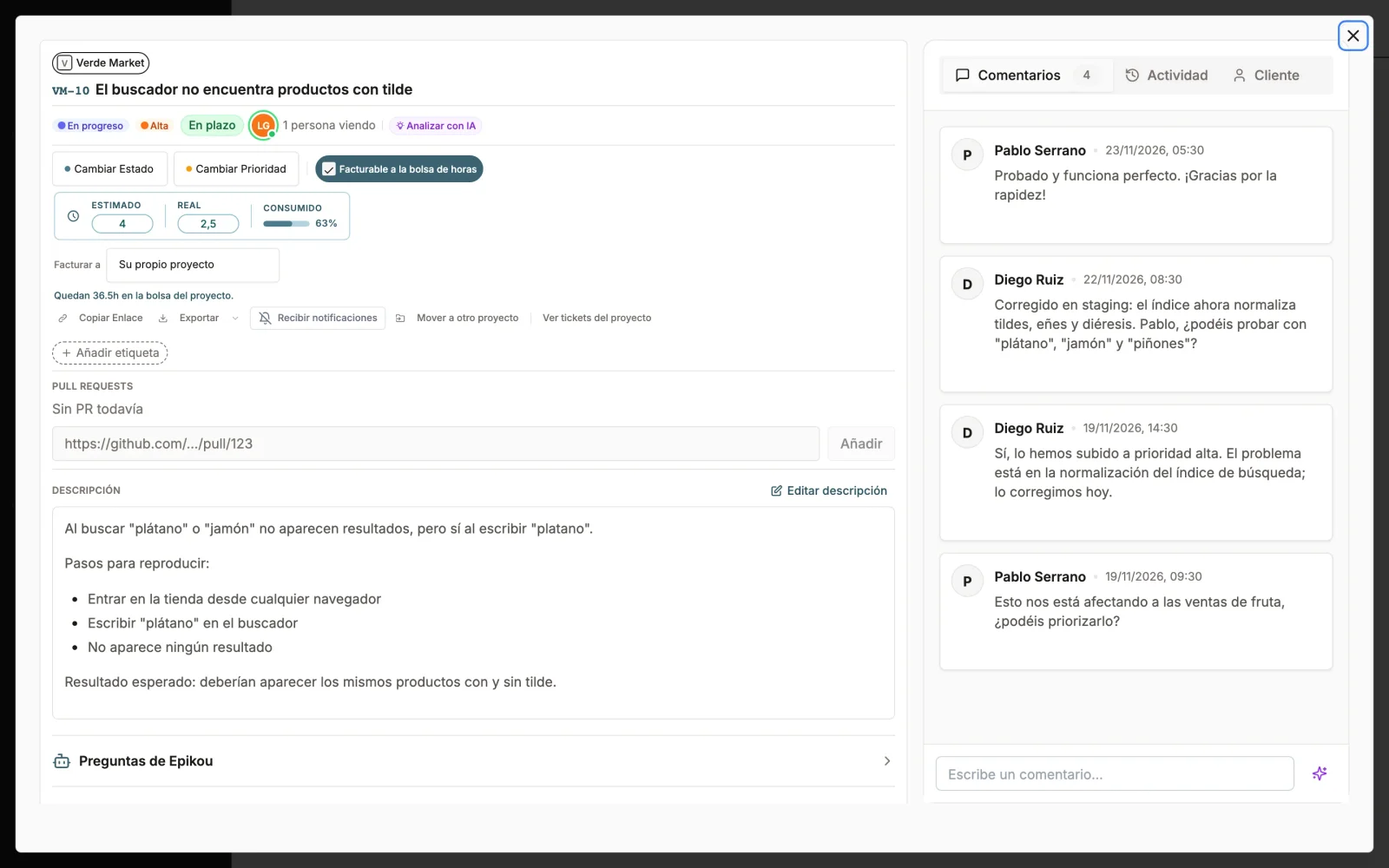
Ticket detail in Epikou with status, priority, SLA on track, estimated and actual hours, hour bank billing, pull requests and the client conversation
Pricing

You pay per agent. Your clients get in free.

Four plans. Clients who open tickets, follow the plan or check their hour bank never count as agents.

Free

To try Epikou with one client.

€0
forever
  • 1 project
  • Up to 3 agents
  • 100 tickets a month
  • 500 MB of storage
  • Unlimited clients
  • No API, MCP or AI

Starter

For teams that bill support hours.

€9
per agent per month
  • Up to 10 projects
  • 1,000 tickets a month
  • 5 GB of storage
  • Work plans with acceptance criteria
  • Sprints
  • Hour bank and quotes
  • GitHub pull requests
  • REST API with personal tokens

Team

Everything in Starter, without volume limits.

€19
per agent per month
  • Unlimited projects and tickets
  • 50 GB of storage
  • AI: summaries, classification and suggestions
  • SLA by priority with business hours
  • CSAT surveys
  • Knowledge base
With MCP

Business

Everything in Team, with Claude Code inside.

€35
per agent per month
Minimum 5 agents
  • 200 GB of storage
  • MCP server for Claude Code and other assistants
  • Audit log, including MCP and API calls
  • White label per client
  • Environment monitoring
  • Onboarding and priority support

Unlimited clients on every plan. Prices exclude VAT. No lock-in. Annual plan: 2 months free.

Product site

Epikou has its own site

Tickets with real statuses, work plans with acceptance criteria, hour banks and SLAs per project, with your clients inside. Pricing and details on the Epikou site.

Before you write to us

Why is your team drowning in tickets?

Six questions on how requests arrive, get prioritised and get closed. Score and priorities, with no email needed to see them.

Centralize your customer support.
See it running before you decide.

We walk you through Epikou live with your real cases: tickets, work plans, hour banks, sprints and Claude Code working over MCP. Guided demo, no commitment, no cost.

No commitment. We reply within 24 business hours.

Frequently asked questions

How much does it cost?
There is a Free plan (1 project, up to 3 agents and 100 tickets a month) and three paid plans per agent per month: Starter at €9, Team at €19 and Business at €35, the latter with a minimum of 5 agents. Only the agents on your team pay: clients are unlimited on every plan. Prices exclude VAT, with no lock-in and 2 months free on the annual plan.
What counts as an agent?
Each person on your team who works tickets: manages them, assigns them or logs hours. Your clients, who open tickets, follow the plan and check their hour bank, never count as agents on any plan.
What is the MCP server and which plan includes it?
It is the connection between Epikou and Claude Code or any MCP-compatible assistant. With a personal token, the assistant reads the task, claims it, ticks acceptance criteria, sets client blockers, links the pull request and moves it to review, with the same permissions as the person who owns the token. Every call is audited. It is included in the Business plan.
Can my clients create tickets directly?
Yes. They get their own portal where they sign up (email or Google), create tickets with attachments, track progress and leave feedback on resolution. You decide what they see and what they don’t.
Does it integrate with our current tools?
From the Starter plan you get a REST API documented with Swagger, with personal tokens, and GitHub pull requests linked to tasks. Business adds the MCP server for Claude Code and other assistants, with the audit log also covering MCP and API calls.
Can we customize the branding for each client?
Yes, on the Business plan: white label per client with logo, colors and domain. Every client sees their own portal, not your company’s.
What happens to our current data?
You can import tickets, clients and projects from CSV. If you’re coming from Jira, Zendesk, Freshdesk or a spreadsheet, we help you bring the history over; on the Business plan it is part of onboarding.
Can we start with just ticketing and add modules later?
Yes. The Free plan covers tickets and the client portal for one project. Move to Starter when you need hour banks, plans with criteria and sprints; to Team for AI, SLA and the knowledge base; and to Business for the MCP server and white label.
Who is behind this?
Soamee, a software development company in Madrid with more than 150 projects delivered since 2017. Epikou is the tool we use to run support and work plans on our own projects.
Book a free call →