Our own product · Soamee case

How we built Tenki: per-project profitability

We are an agency that sells projects and hours. We needed to know what each project earns while there is still time to fix it, so we built Tenki and use it every day. This page covers the challenge, how it is built and its stack. The product itself, with access, lives on its own site.

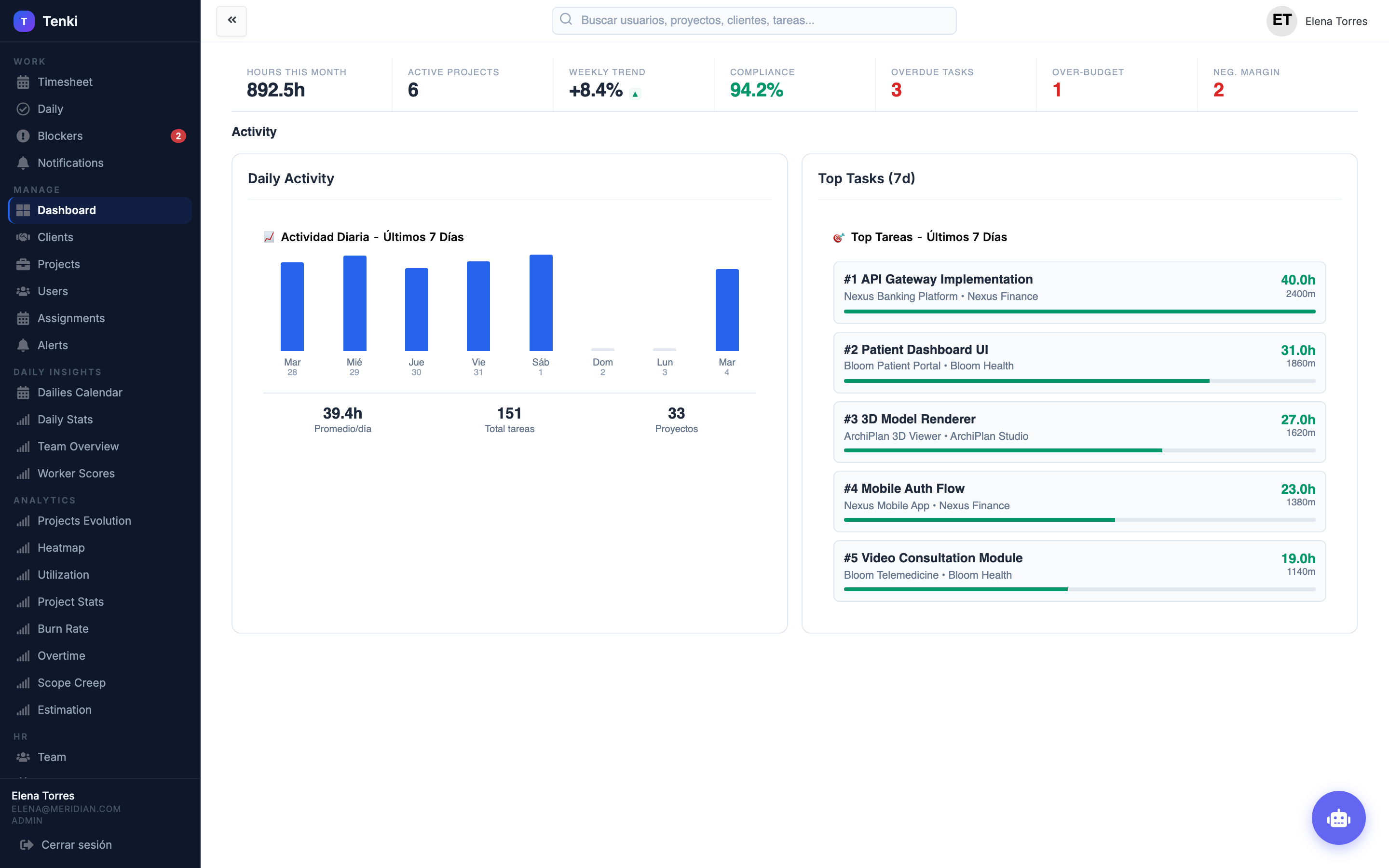
Tenki home dashboard with projects, team activity and profitability
ways to bill a project: hourly, fixed price, monthly fee and hour bank
4
invoice states: draft, invoiced, paid and rejected
4
roles: team member, project manager and admin
3
of working time without logged hours triggers an email reminder
48 h

Tenki configuration facts published at tenki.soamee.com.

The challenge

A project’s margin was only known once it had closed

Knowing whether a project makes money means crossing three pieces of data: the hours the team spends on each task, what each person’s hour costs, and what has been invoiced and collected. In an agency those three usually live in different places: a time tracker, payroll and invoicing.

An agency runs fixed-price, hourly, monthly-fee and hour-bank projects side by side, and each model counts revenue differently. A time tracker records time; subtracting the team’s cost from what was invoiced, under each model’s rules, was left to a spreadsheet filled in at the end of the month.

Tenki’s goal was to keep the margin of every project and client in view while the project is still open, and to show financial data only to the people who should see it.
How we solved it

From the logged hour to the project margin

Tenki is a web dashboard. Each part solves one piece of the cross-check and feeds the next.

01

Hours per task, with estimates

Everyone logs time in their timesheet by project and task. Tasks carry an estimate and Tenki warns when one runs over. Anyone who goes two working days without logging gets an email reminder, and an in-app assistant lets people log or fix hours by typing.

02

The real cost of each person

The hourly cost comes from gross annual salary and contract type. With it, Tenki works out what each project has cost and compares it with what was invoiced. Loss-making projects are flagged in red.

03

Invoices and expected payments

Each project has its invoices with expected and actual payment dates. They can be imported from CSV with a preview and per-line errors, and monthly-fee projects generate their draft invoice on their own.

04

Profit and loss

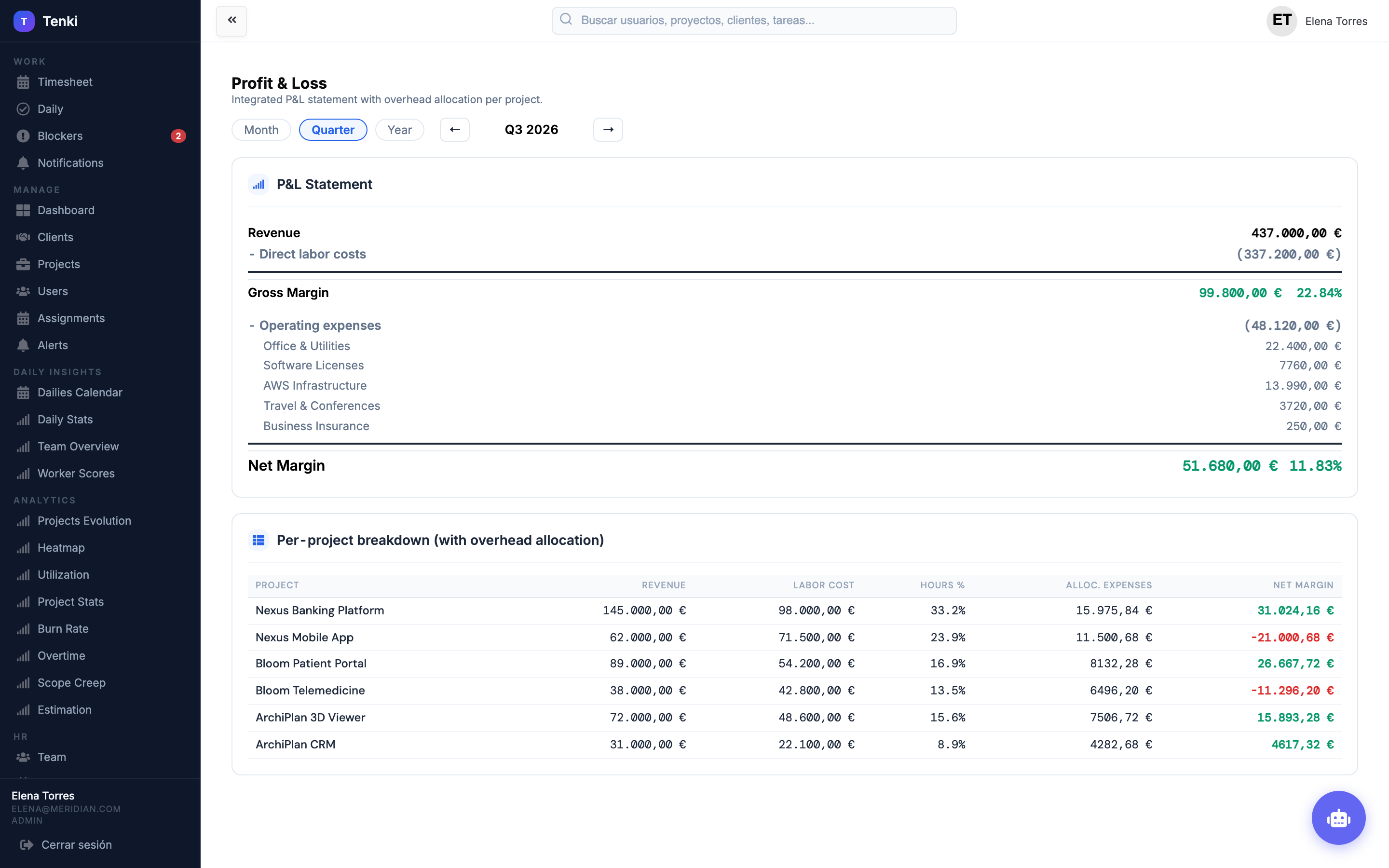
Revenue, team cost and overheads allocated by project, per month or quarter, with lists of projects with negative margin or over budget.

05

Who is on what

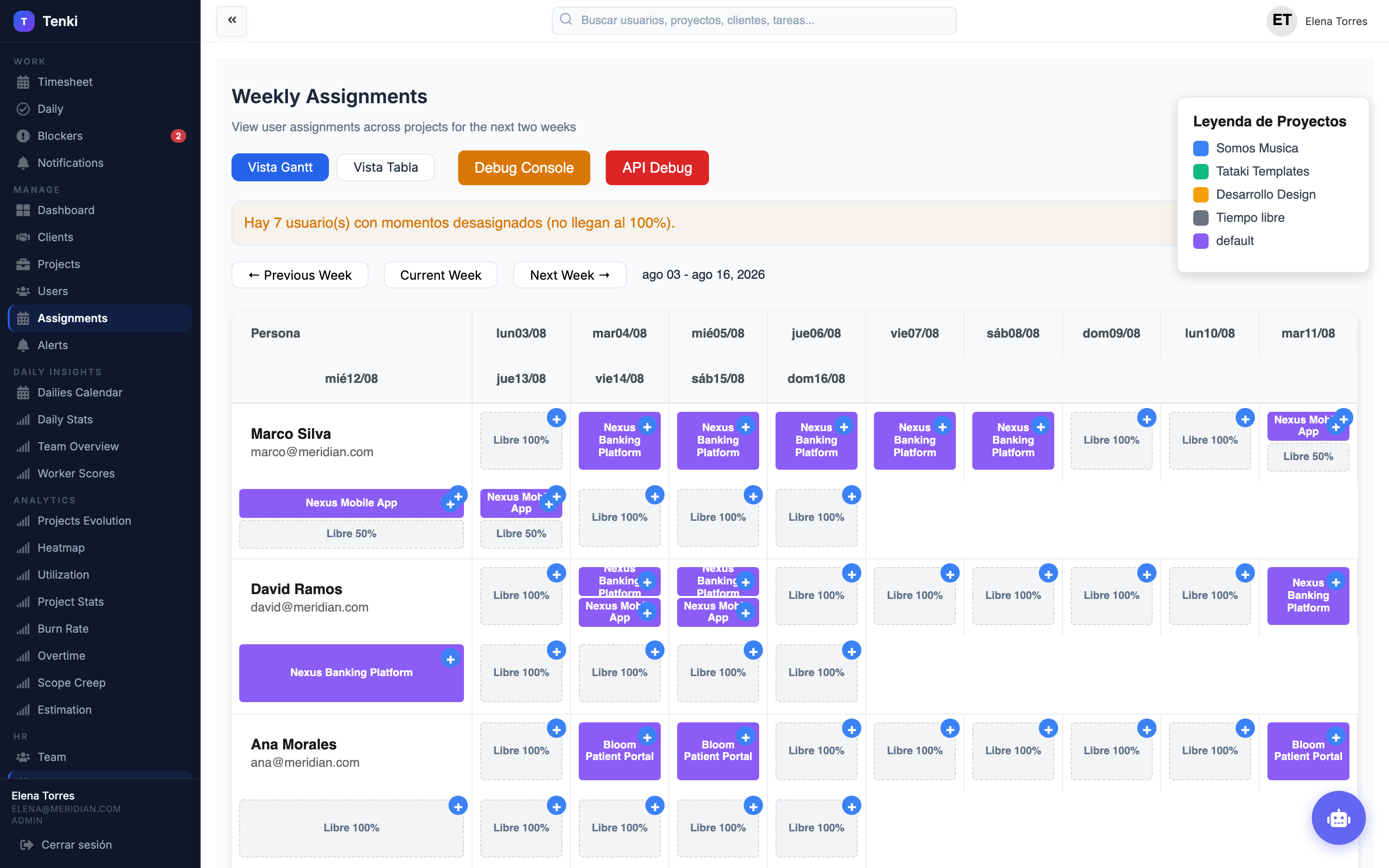
Weekly assignments per person that are copied to the next week on Fridays, a Monday report of the next two weeks, dailies with blockers, and alerts for weeks over 40 hours.

06

Each role sees its own

There is no open sign-up: admins create each account and choose its role. Salaries, costs and margins are visible to admins only. A new project can be created by pasting the proposal: Tenki drafts the client, estimated tasks and invoices for review.

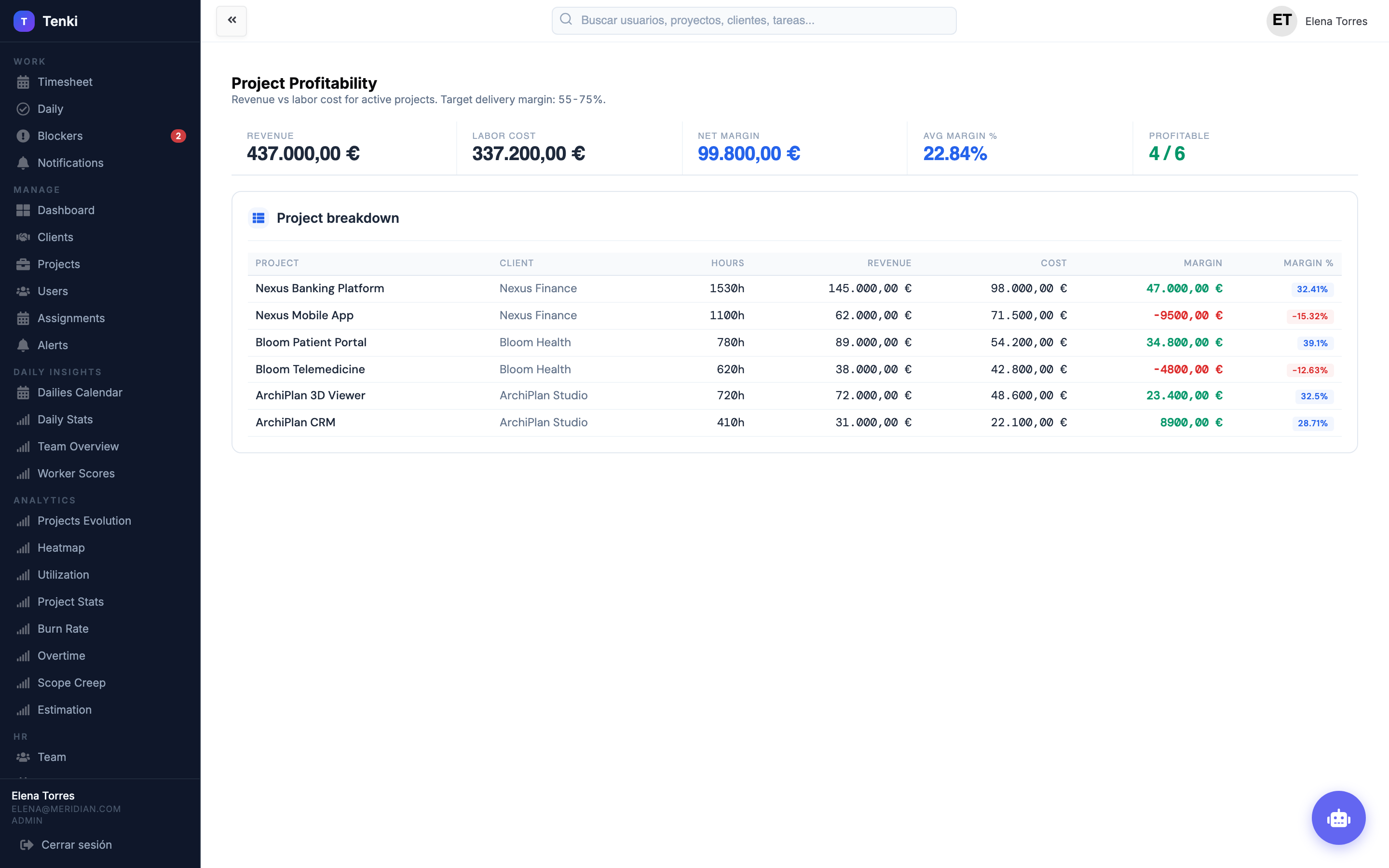
Per-project profitability in Tenki: revenue, team cost and margin
Each project’s margin: invoiced amount against team cost.
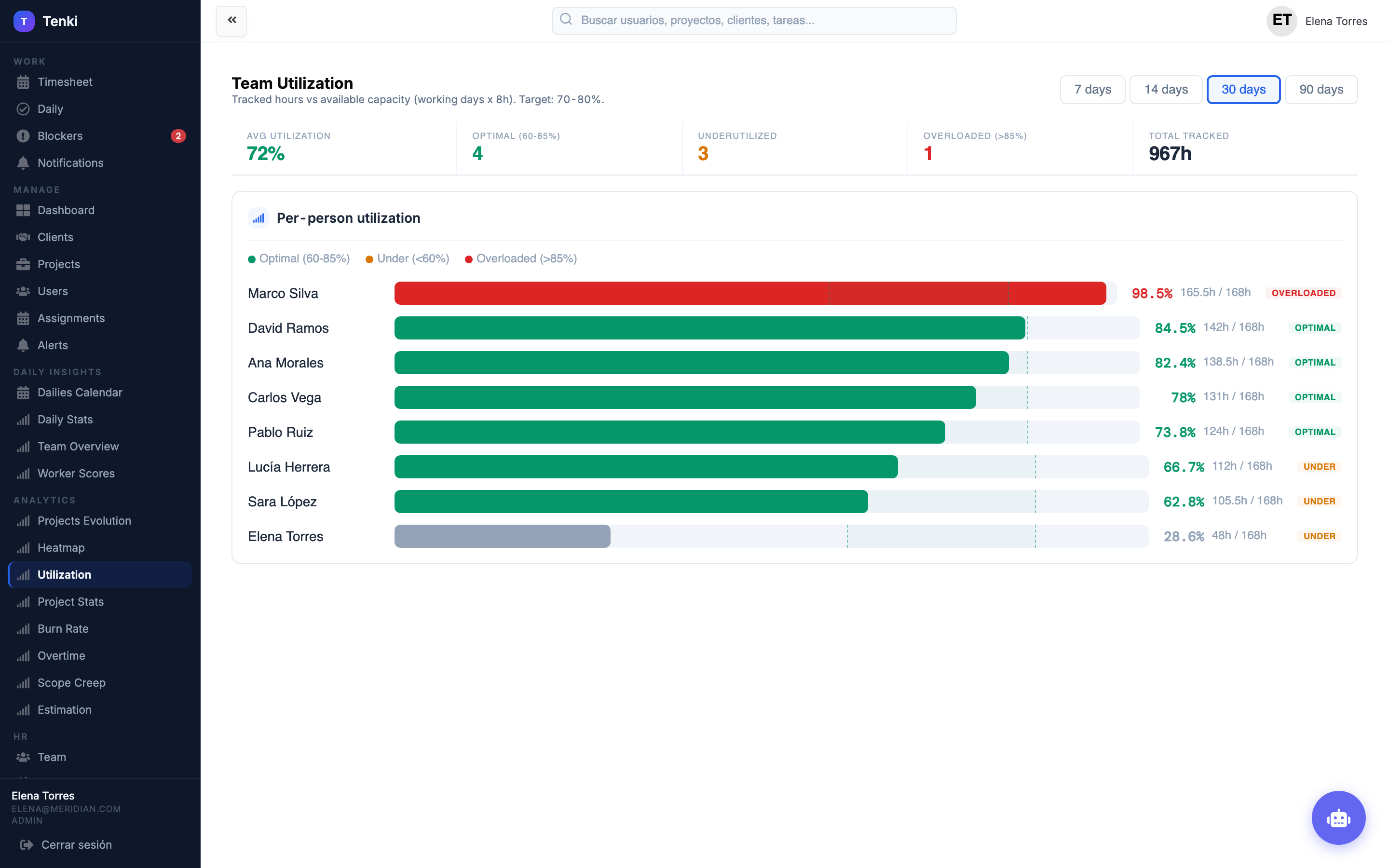
Tenki utilisation: hours logged against available hours per person
Utilisation: hours logged against available hours.
Weekly team assignments in Tenki
Weekly assignments: who is on which project.
Monthly profit and loss in Tenki
Profit and loss with allocated overheads.
Stack

How it is built

The same stack we use on client projects, in a TypeScript monorepo where the API and the dashboard share types.

  • Nx + TypeScript

    Monorepo with the API, the dashboard and shared libraries.

  • NestJS

    API with role-based permissions: financial endpoints only answer to admins.

  • PostgreSQL + Prisma

    Hours, costs, invoices and expenses in a relational model; margins are calculated on top of it.

  • Next.js + React Query

    Web dashboard with timesheet, profitability, payments and assignments.

  • Scheduled jobs

    Missing-hours reminders, copying assignments on Fridays and the Monday report.

  • Transactional email

    Alerts and reminders for the team and for admins.

What it shows about Soamee

What we then apply on client projects

Management software with money inside

Costs, invoices and margins with different rules per billing model, and permissions that keep financial data apart.

B2B SaaS development

Dashboards that answer one question

Each Tenki view answers one thing: which project is losing money, who is overloaded, which payment is late.

Custom dashboards

AI that saves work, reviewed

Logging hours by typing and creating a project from its proposal. What the AI suggests stays a draft until someone reviews it.

Applied artificial intelligence

Want to use Tenki with your team?

Features, FAQ and access are on the product’s site.

Go to tenki.soamee.com (site in Spanish)
Product site

Tenki has its own site

Hours, costs and billing per project, so you know what each one earns. Product detail, support and access are there.

FAQ

Frequently asked questions

Where can I get Tenki?
At tenki.soamee.com (site in Spanish). Tenki has no open sign-up: you request access on its site and each company’s admin creates the team’s accounts.
Does Soamee use Tenki?
Yes. Our team logs the hours of client projects in Tenki and we use it to follow each project’s margin.
Can you build something similar for my company?
Yes. We build custom management software when an off-the-shelf tool does not fit how your company bills or works. We can talk it through in a free consultation.
How we built Tenki: per-project profitability

Tell us your challenge. We'll propose a solution.

No commitment. We reply within 24 hours, and within 48 hours you have a proposal with scope, timeline and budget. No fine print.

Book a free call →